

A useful box build assembly quotation starts with a clear definition of the finished product. The manufacturer needs to understand which parts to source, how the electronics fit inside the enclosure, what software to load, and how each completed unit will be accepted. Missing decisions become assumptions in the quotation, then questions during production.
For engineers and procurement teams, the goal is to make those assumptions visible before placing an order. The following eight checks help turn a collection of design files into a request for quotation, or RFQ, that suppliers can evaluate consistently.
Contents
- 1. Define the finished product and the assembly scope
- 2. Build a product BOM beyond the circuit board
- 3. Match PCB and enclosure revisions
- 4. Remove ambiguity from cable and harness drawings
- 5. Specify firmware and configuration
- 6. Turn testing into measurable acceptance criteria
- 7. Separate unit costs from project costs
- 8. Define labels, packaging and change approval
- A pilot build example
- Frequently asked questions
- Prepare the package for review
1. Define the finished product and the assembly scope
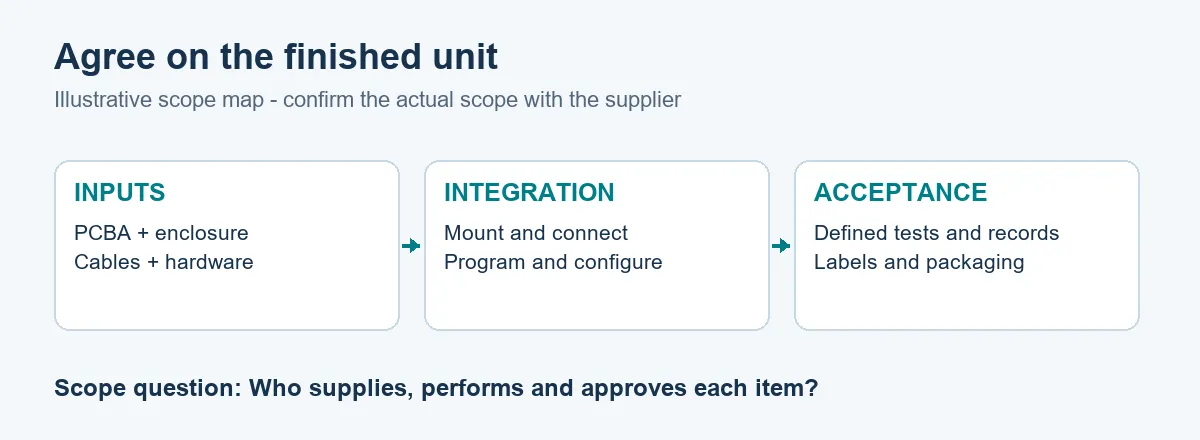
Write a short description of what the supplier must deliver: an enclosure containing an installed PCBA, connected cables, loaded firmware, completed tests, and specified accessories, for example. State which activities are included and who supplies each major item.
The scope of box build assembly can extend from integrating supplied electronics into a housing to coordinating PCB assembly, mechanical parts, wiring, testing, and packaging. Your RFQ should identify the actual work required for your product.
Include the intended application and operating conditions that affect material selection or test planning. Mark unresolved requirements as open issues with a named owner. A quotation based on preliminary files should identify its assumptions and the conditions that would require repricing.
2. Build a product BOM beyond the circuit board
The PCB bill of materials describes the parts mounted on the board. The product-level BOM must also account for the enclosure, mounting hardware, connectors, cables, labels, and accessories that leave the factory with the unit.
For each purchased item, identify its part number, description, quantity, revision where applicable, and sourcing responsibility. Separate customer-supplied materials from supplier-purchased parts. Define approved alternatives and the approval process for substitutions.
A generic entry such as “four mounting screws” leaves the supplier to choose dimensions and material. Reference the specified fastener instead, and use the assembly drawing to show where it belongs. For supplied parts, confirm quantities, identification, expected condition, and how shortages or damaged items will be handled.
3. Match PCB and enclosure revisions
Release the board and mechanical information as a coordinated package. Provide the relevant PCBA drawings and, if board manufacturing is included, the agreed fabrication, placement, and BOM files. For the enclosure, include a dimensioned drawing and a 3D model when available.
Review mounting-hole locations, connector alignment, component height, and access for assembly tools. Check that cables can be connected and routed before the enclosure is closed. Identify any specified thermal pads, interface materials, mounting sequence, or tightening instructions.
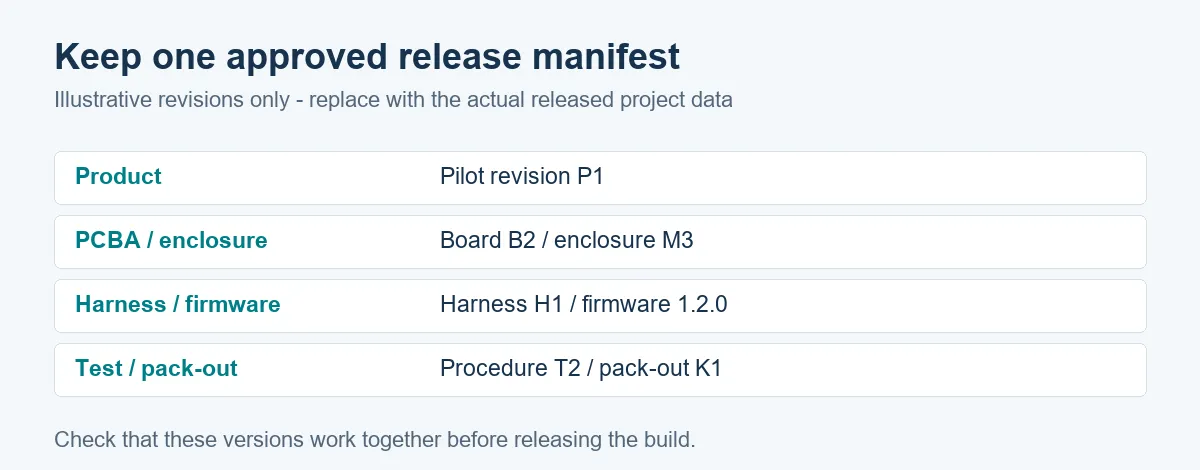
Use a release manifest to list the approved revisions. A later board revision may move a connector even when the enclosure filename remains unchanged. Explicitly checking the combination makes that mismatch easier to catch before parts are ordered.
4. Remove ambiguity from cable and harness drawings
Specify connector housings and contacts, wire requirements, cable lengths and tolerances, pin assignments, and required identification. State whether a connector illustration shows the mating face or the wire-entry side; a pin map without a defined viewing direction can be misread.
Document routing constraints and strain-relief arrangements where they affect the assembly. Identify the points used to measure cable length, especially when connector bodies or branched harnesses make the interpretation unclear.
For an early prototype, a marked-up photograph can help explain the intended layout. Use it alongside the relevant drawing or pin table, and identify any details still awaiting release. Agree on the required harness checks before installation.
5. Specify firmware and configuration
Treat firmware as a controlled build input. Identify the approved file and version, the programming method, and any required programmer, adapter, fixture, or configuration utility. State who provides and maintains each item.
Explain how the operator verifies the loaded version and confirms successful programming. Define product variants, default settings, and serial-number assignment if those affect how the unit operates. Avoid relying on an instruction such as “load the latest firmware,” because the approved version can change during the build.
If credentials or device-specific provisioning are involved, agree on an appropriate controlled process with the responsible teams. Public quotation documents should describe the requirement without exposing production secrets. Define who approves the programming instructions before the pilot run.
6. Turn testing into measurable acceptance criteria
“Fully tested” does not tell two suppliers to perform the same work. Describe the checks required, the equipment or fixture used, the test conditions, and the pass/fail limits. Explain whether testing occurs before enclosure closure, after final assembly, or at both stages.
For a communication interface, specify the connection, command, and expected response. For an analog measurement, supply the input condition and acceptable output range. Set those values from the product requirements and engineering validation rather than leaving the operator to judge what looks reasonable.
Define the required records: unit serial number, hardware revision, firmware version, results, and test date, for example. Identify who develops the fixture, maintains the test software, and approves changes. Board inspection and final product functional testing provide different evidence; request the coverage the finished product needs.
7. Separate unit costs from project costs
Ask suppliers to distinguish recurring costs from one-time charges. The quotation may include materials, integration labor, programming, testing, and packaging per unit, alongside engineering preparation, tooling, fixture development, or setup charges.
Use the same quantity and scope when comparing offers. Confirm whether a proposed enclosure modification, test fixture, or packaging design is included. If you plan a pilot followed by repeat batches, request both quantities and ask which charges will recur.
Define the starting point for the quoted lead time. Material availability, design approval, fixture readiness, and receipt of customer-supplied items may affect when assembly can begin. A schedule is more useful when the quotation names those dependencies and identifies how unresolved inputs will be managed.
8. Define labels, packaging and change approval
Provide approved label artwork, placement instructions, and any serial-number or barcode rules. List the accessories, documents, and cables packed with each product. Identify the packaging arrangement needed to protect the assembly and meet the agreed shipping requirements.
Document who can approve a substitution, drawing change, firmware update, or temporary deviation. Record which units are affected and whether existing stock needs review. A change agreed in a message should be reflected in the controlled build information before repeat production.
Before releasing the full batch, agree on a pilot acceptance point. Review the completed unit, build documentation, test evidence, and pack-out together. Resolve the findings and approve the resulting configuration for the next build.
A pilot build example
Consider a hypothetical order for 25 sensor interface units. Each unit contains a PCBA, a machined enclosure, two internal cables, one external connector, and programmed firmware.
The initial RFQ includes a PCB BOM and an enclosure model. During review, the team identifies three open items: the external connector pin table has no viewing direction, cable length is measured from an undefined point, and the test instruction says only “check sensor operation.”
The engineer adds a connector view, defines cable measurement points, and writes a test procedure with input conditions and acceptance limits. Procurement updates the product BOM and confirms which party supplies the connector. The released manifest ties those documents to the pilot revision.
These are illustrative project details, not a customer case study. They show how small documentation decisions can determine the work a supplier must quote and perform.
Frequently asked questions
Can a supplier quote before all drawings are complete?
Often, an initial discussion or budget estimate is possible. Identify missing information and ask the supplier to state assumptions, exclusions, and the inputs needed for a production quotation.
Can the manufacturer use customer-supplied PCBAs?
That can be part of the agreed scope. Confirm incoming inspection, identification, handling requirements, and responsibility for defective or insufficient supplied units before scheduling integration.
Is a working sample enough to start repeat production?
A sample helps communicate fit and function, but it should be supported by controlled drawings, material specifications, configuration instructions, and acceptance criteria. Agree on how differences between the sample and the released documents will be resolved.
Who should provide the test fixture?
Either party may provide it under the agreed scope. Identify who designs, approves, supplies, and maintains the fixture and test software, and show any development charges separately in the quotation.
Prepare the package for review
Before requesting a quotation, assemble a release manifest, product BOM, electronic and mechanical files, wiring information, firmware instructions, test requirements, and pack-out details. Add the requested quantity, schedule, and a short list of open issues with their owners.
For teams evaluating a manufacturing partner, OrinewPCB presents PCB manufacturing, assembly, and system integration services on its website. Send the coordinated project package for review and ask the supplier to identify assumptions and exclusions before comparing price or committing to a build.